EaseTools 1.0 · $9.99 one-time

The only panel your timeline needs.

27 After Effects actions. One click each. One docked panel that quietly deletes the menu diving from every comp you open.

After Effects 2019+ · Windows & macOS · single .zxp · lifetime updates

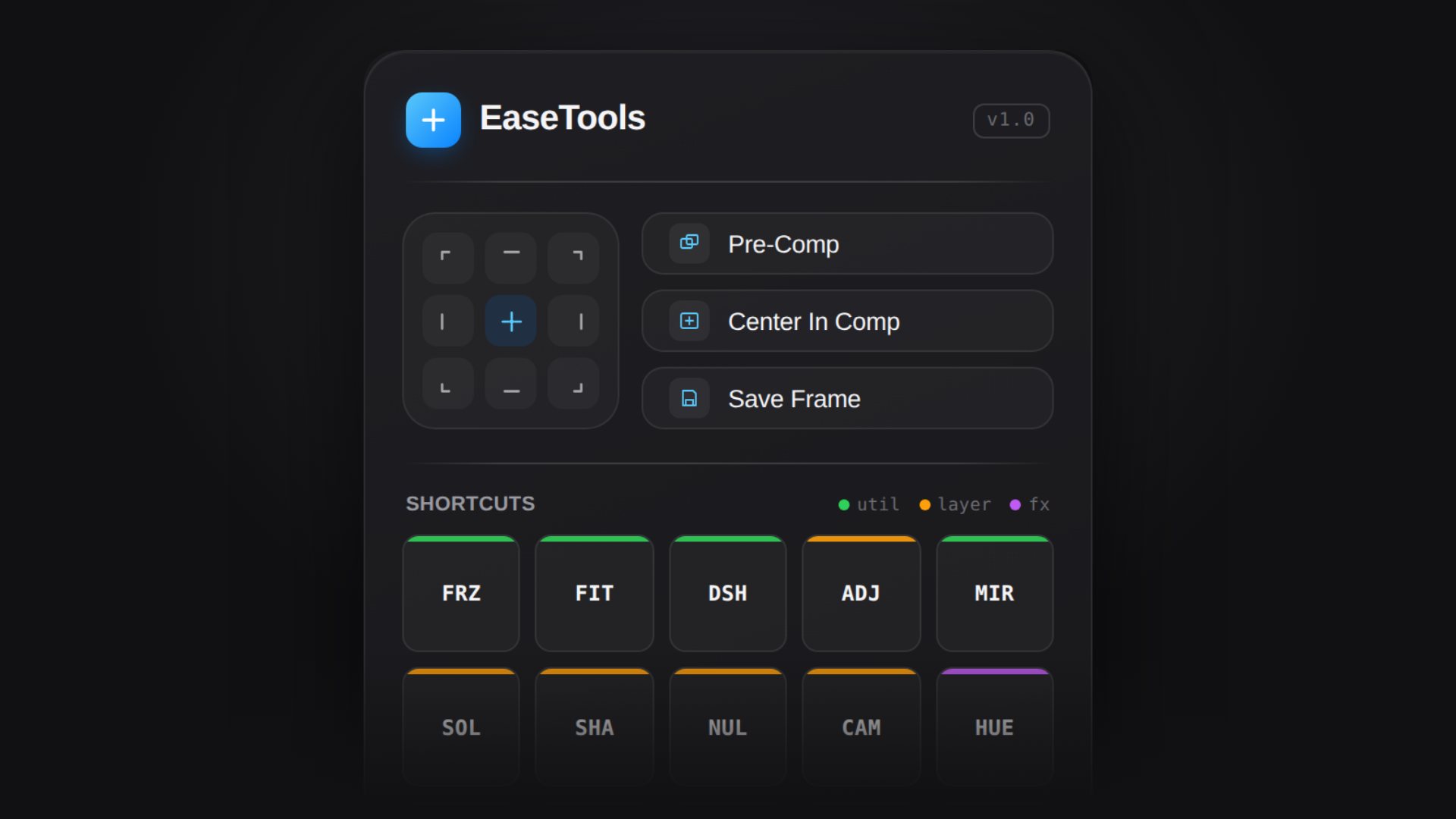
EaseTools
v1.0
SHORTCUTS
util
layer
fx

Live panel — click anything

14-day money-back guaranteeSecure Gumroad checkoutNo subscription
  one-click align  pre-comp  adjustment layer  solid  null  camera  gaussian blur  hue / saturation  tint  fill  curves  levels  freeze frame  fit to comp  dashed outline  mirror layer  save frame  shape layer  one-click align  pre-comp  adjustment layer  solid  null  camera  gaussian blur  hue / saturation  tint  fill  curves  levels  freeze frame  fit to comp  dashed outline  mirror layer  save frame  shape layer
27
tools in one panel
1
click per action
$9.99
once, forever
90s
to install
The workflow

Five actions.
Five clicks.

The comp you just opened already wants alignment, pre-comp, a layer, an effect, and a freeze frame. With EaseTools, that whole sequence is five clicks — not five menu hunts.

1Align layer
Layer → Transform → Anchor Point → drag to center
1 click
2Pre-compose
Layer → Pre-compose → name → OK → move
1 click
3Adjustment layer
Layer → New → Adjustment Layer → rename → color
1 click
4Gaussian blur
Effects → Blur & Sharpen → Gaussian Blur → adjust
1 click
5Freeze frame
Layer → Time → Freeze on Frame → pick frame
1 click
What it does

Every move that used to take four clicks.

A tiny panel that sits in the corner of After Effects and quietly deletes the friction from the workflow you already have.

align

9-point align

Snap anchor points to any corner, edge or dead-center in a single click. No submenus, no math.

flow

Pre-comp & center

Pre-comp selection, center in comp, save the current frame — the three moves you do a hundred times a day.

layers

Layers on tap

Adjustment, solid, shape, null, camera. Named, coloured and ready before you finish the thought.

fx

Effects, pre-configured

Gaussian Blur, Curves, Levels, Hue/Sat, Tint, Fill — applied with sane defaults, not raw sliders.

util

Utility shortcuts

Freeze frame, fit to comp, dashed outline, mirror layer. The small wins that compound all day.

price

Pay once, keep it

One payment and it's yours — every future update included. No subscription, no license server, no watermark.

See it in action

Watch a workflow disappear.

This is the same panel you install in After Effects. Same clicks, same speed, zero menu diving.

Why not the free scripts

Free scripts are cheap.
Your time isn't.

Install
Drop a .jsx into a Scripts folder and hope
One signed .zxp — same file for Windows and macOS
Interface
Grey dialog boxes, tiny buttons
Docked panel built for AE's dark UI
Coverage
One trick per script, scattered
27 tools — align, layers, effects, utilities — in one place
Updates
Abandoned when the author moves on
Lifetime updates included with your purchase
Support
A dead forum thread from 2017
Direct email support from the developer
Risk
Random code from an unknown zip
14-day refund, no questions, via Gumroad
What lands in your inbox

One download.
Everything in it.

Buy once and Gumroad delivers instantly — a single .zxp that installs the same way on Windows and macOS, plus the quick-start guide.

EaseTools.zxp

One file, both platforms — install it with the free ZXP Installer app in seconds.

27 tools

Align, pre-comp, layer utilities, pre-configured effects and 15 assignable shortcuts.

Quick-start guide

A one-page PDF: install, dock the panel, and the shortcut map for all 27 tools.

Lifetime updates

Every future version lands in the same Gumroad library — no extra charge, ever.

Built by a motion designer
not a tool factory
The maker

I built this because my own comps were too slow to make.

EaseTools started as a private panel I kept in the corner of After Effects. Every time I caught myself opening four menus to add one adjustment layer, I added another button. After months of real client work, it became the only panel I never close.

Now it is one signed .zxp for Windows and macOS, 27 tools, and a single price. No upsells, no license servers, no surprises.

Made for motion designers working on
Music videosYouTube editsClient campaignsReels & TikTokMotion packagesBrand systems
Wall of love

What buyers say.

EaseTools is brand new. The first verified reviews will live here as soon as buyers start sharing them. Want to be featured? Drop a note after you install.

10–20 min
Time saved per project
Faster alignment, pre-comp, and layer setup every time you open a comp.
4→1
Clicks eliminated per action
No more nested menus for the most common After Effects tasks.
14 days
Money-back guarantee
If it doesn't fit your workflow, you get a full refund. No questions.
Pricing

One price.
$9.99 forever.

Less than a lunch, once. Checkout runs on Gumroad — the .zxp lands in your inbox the second the payment clears.

  • 14-day money-back guarantee
  • Secure Gumroad checkout — card, PayPal, Apple Pay
  • No account, no activation, no license server
  • Direct support from the developer
$9.99one-time
Secure checkout via Gumroad
  • Full panel — align, pre-comp, layers, effects, shortcuts
  • EaseTools.zxp — one file for Windows & macOS
  • Every future update, free
  • 14-day money-back guarantee

Instant download · one .zxp for Windows & macOS

Questions

Everything you'd ask before paying.

Which After Effects versions work?

After Effects CC 2019 and newer, on both Windows 10/11 and macOS (Intel and Apple Silicon). If it doesn't open in your version, you get a refund.

How do I install the .zxp?

Drag EaseTools.zxp into the free ZXP Installer app (Windows or macOS), then restart AE and open Window → Extensions → EaseTools.

Is this a subscription?

No. One payment of $9.99 and the panel is yours, including every future update. No license servers, no activation, no watermark.

Can I use it on client work?

Yes — commercial use is covered, on the machines you personally work on.

What if it isn't for me?

Email within 14 days and you get your money back through Gumroad. No forms, no justification needed.

Do updates cost extra?

Never. Updates are re-downloaded from the same Gumroad link you already own, free, for the life of the product.

Getting started

Three steps. Ninety seconds.

01

Buy & download

One $9.99 payment on Gumroad, then download EaseTools.zxp.

02

Install the panel

Drop EaseTools.zxp into the free ZXP Installer app — same steps on Windows and macOS.

03

Open in After Effects

Restart AE, then Window → Extensions → EaseTools. That's it.

If After Effects doesn't list the panel right away, fully quit and reopen it — extensions are only scanned at launch. Works the same on Windows and macOS.